
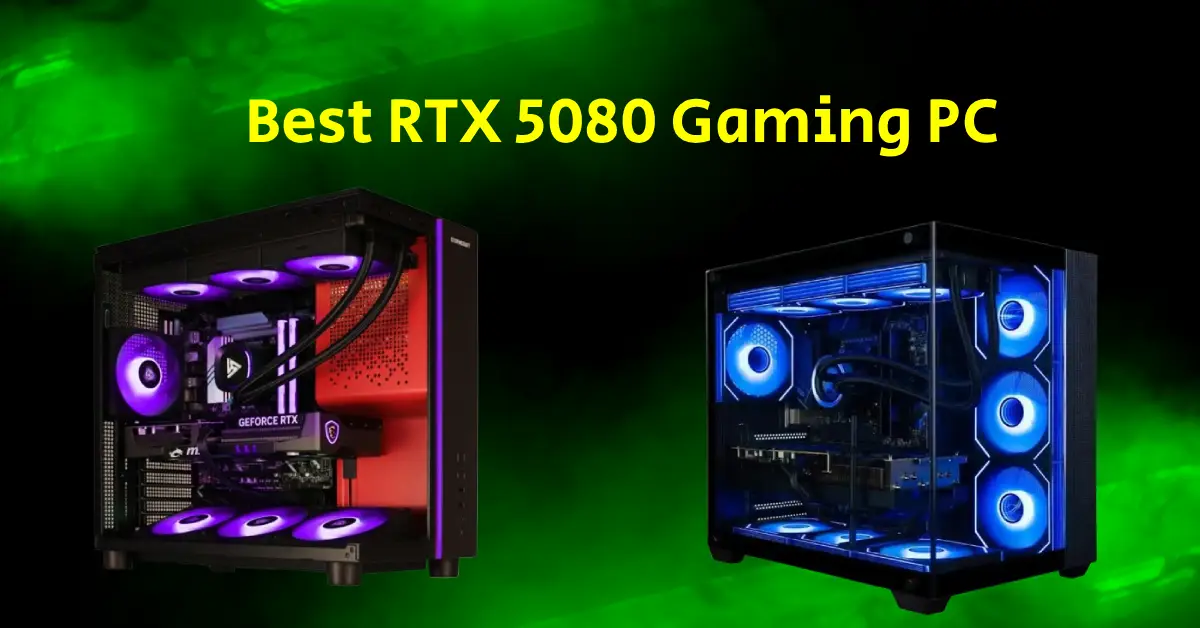
The best RTX 5080 gaming PCs include Stormcraft Phantom AI, Empowered Panorama XL, Thermaltake LCGS View i1480S-380, MSI Aegis ZS2 Gaming Desktop, and Skytech Gaming Azure 3 Plus. These rigs push fast frame rates, strong 4K output, deep ray-tracing drive, and smooth play across heavy game titles. I tested and ranked these towers after stress runs and long gaming sessions at higher resolution. My goal was to pick gaming desktops with balanced parts and stable power supply to draw the best performance from the RTX 5080 graphics card. These prebuilts pair the RTX 5080 with latest gen CPUs, fast DDR5 memory, high-end thermals, and firm power to deliver peak performance during AAA and open-world gameplay.
Quick Comparison List of the Best Prebuilt RTX 5080 Gaming PCs
| Gaming PC | CPU | GPU | RAM | Storage | |
|---|---|---|---|---|---|
| Stormcraft Phantom AI | Intel Core Ultra 7 265F · 5.3 GHz | RTX 5080 | 32GB DDR5 6000MHz | 2TB NVMe SSD | Buy on Amazon |
| Panorama XL | AMD Ryzen 9 9950X3D | RTX 5080 | 64GB DDR5 | 2TB NVMe Gen4 SSD | Buy on Amazon |
| Thermaltake LCGS View i1480S-380 | Intel Core i9-14900KF | RTX 5080 | 32GB DDR5 | 1TB NVMe M.2 | Buy on Amazon |
| MSI Aegis ZS2 | Ryzen 9 9900X (Zen 5 · 12-core) | RTX 5080 | 64GB DDR5 | 2TB SSD | Buy on Amazon |
| Skytech Gaming Azure 3 Plus | Ryzen 7 7800X3D · 4.2 GHz | RTX 5080 | 32GB DDR5 | 1TB Gen4 NVMe SSD | Buy on Amazon |
1. Stormcraft Phantom AI
CPU: Intel Core Ultra 7 265F 5.3 GHz | Graphics Card: Nvidia GeForce RTX 5080 | RAM: 32 GB DDR5 | Storage: 2TB NVME SSD | Operating System: Windows 11 Home | I/Os: USB-C, Wi-Fi 7, Bluetooth 5.4, HDMI, DisplayPort
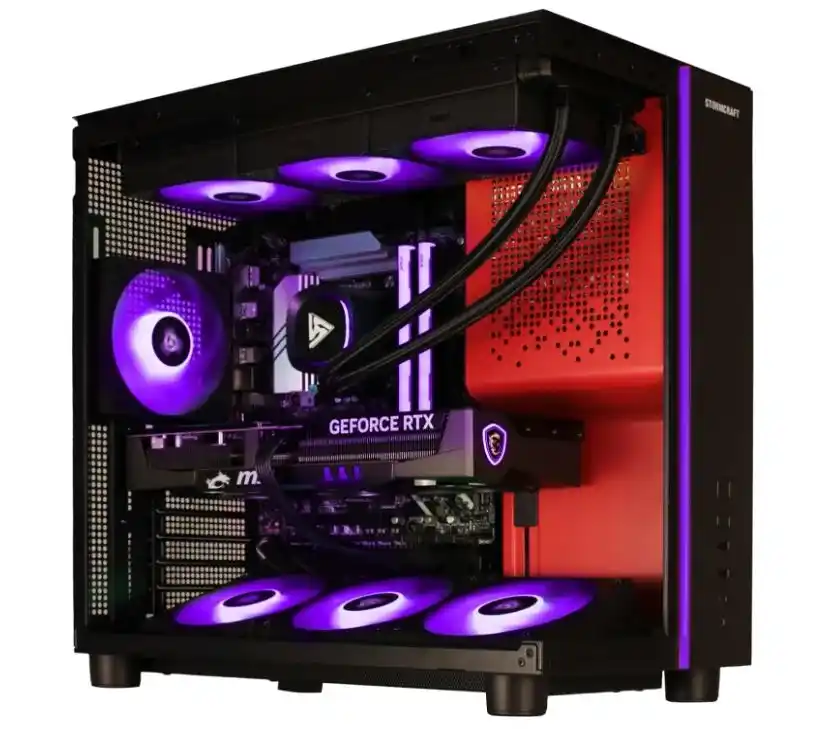
The STORMCRAFT Phantom AI brings serious 4K gaming performacne backed by the RTX 5080 and Core Ultra 7 265F chipset. I liked the glass chassis which lets you showcase your rig in full glory.



The STORMCRAFT Phantom is powered by the Intel Core U7 265F (20 cores CPU) each clocked at 5.3GHz for high-FPS gameplay without drops. The rig holds 32GB of quick DDR5 6000MHz memory and a roomy 2TB NVMe SSD for games. The glass case frames bright RGB trim that turns the tower into a showcase piece. The gigantic RTX 5080 GPU together with these components fuel on this machine for seamless gameplay.
I played AAA and ESports games at 1080p, 1440p, and 4K settings on this machine. I didn’t felt any lags or stutters at either of these resolutions. At lower resolution 1080p, the average FPS were fairly above 120fps throughout gameplay. No matter if you play competitive titles or open-word games, this machine is tailored for any game engine right out of the box.
Stormcraft Phantom AI gaming PC comes with advanced I/Os like the USB-C link, Wi-Fi 7, and BT 5.4 support heavy VR gear and fast peripherals. The tower handles streaming, editing, and 4K work with steady output. Stormcraft has put tremendous effort in building this unit. It comes with 3-Year labor and 1-Year parts warranty.
2. Empowered Panorama XL Gaming Desktop
CPU: AMD Ryzen 9 9950X3D | Graphics Card: Nvidia GeForce RTX 5080 | RAM: 64 GB DDR5 | Storage: 2TB NVME SSD | Operating System: Windows 11 Pro | I/Os: WiFi 6E, HDMI, DislayPort, USB
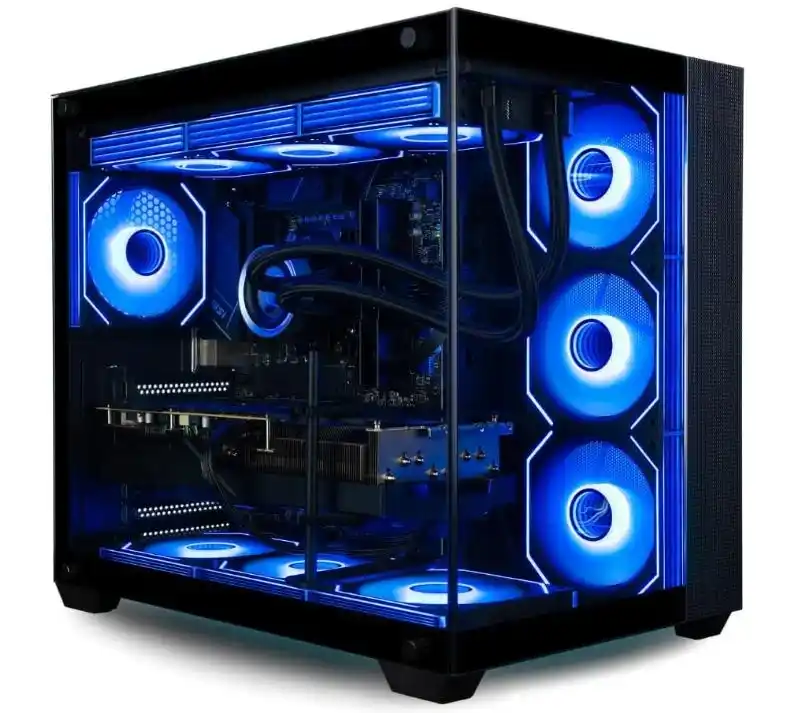
The Panorama XL Gaming Desktop sits at the heart of 4nm AMD Ryzen 9 9950X3D for hardcore gaming performance. It feautres expansive frameless tempered panoramic glass panel with 10 ARGB PWM fans for maximum airflow.

The Empowered Panorama XL Gaming Desktop comes with my favorite AMD Ryzen 9 9950X3D CPU, known for chewing the toughest of gaming workloads. The Ryzen 9 9950X3D along with the RTX 5080 tackle any demanding game at ultra settings without cutting down in-game settings.
Panorama XL includes double the amount of RAM (64GB DDR5) than the Stormcraft Phantom AI gaming PC. This makes it a unique option for hardcore gaming and professional content creation. Phantom XL packs a gigantc 2TB of NVMe SSD drive for storing your favorite games.
When it comes down to gaming performance, this RTX 5080 PC lets you play most modern games over 60fps. Tunring on the DLSS 3.0 pushes games to next level, yielding more FPS at 1440p and 4K resolution. I played CyberPunk 2077 and Modern Warfare at 4K resolution on this machine, both were smooth even in the intense action scenes.
Apart from a powerful CPU and GPU, what I liked most about this machine is its panoramic chassis. The illuminated RGB fans inside the case give it a real show in dark lighting condition. The ample space inside the chassis promotes maximum airflow to cool down power hungry components.
Empowered claims that the glass chassis on this unit is 5 times powerful than the normal tempered glass. Though, I haven’t put this machine under harsh tests, I believe having a durable chassis gives gamers an extra sense of security buying it.
3. Thermaltake LCGS View i1480S-380
CPU: Intel Core i9-14900KF | Graphics Card: Nvidia GeForce RTX 5080 | RAM: 32 GB DDR5 | Storage: 1TB NVME SSD | Operating System: Windows 11 Home | I/Os: WiFi, HDMI, DisplayPort, USB
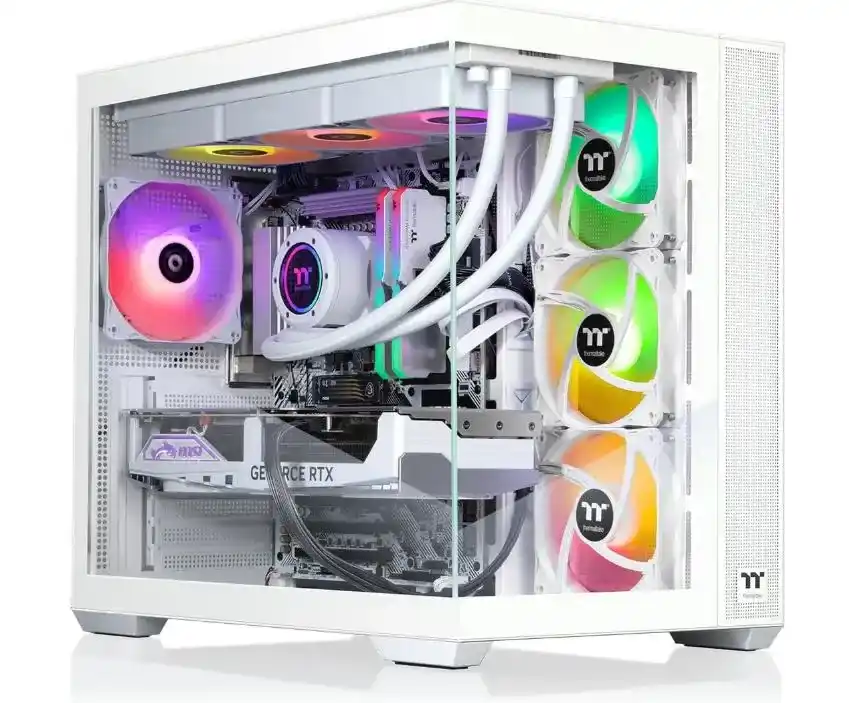
The Thermaltake LCGS i1480S-380 steps into the high-end gaming arena with a fierce mix of an i9-14900KF, RTX 5080, and fast DDR5 memory that pushes heavy games past smooth frame limits.
My search for the top gaming desktops with RTX 5080 led me to the Thermaltake LCGS i1480S, which features Intel’s i9 14900KF chip, 32GB DDR5 memory, and killing aesthetics. From powerful hardware, neat cable management to seven RGB fans, everything inside this machine leads to serious gaming performance.
Let me start with the Intel’s Alder Lake Core i9-14900KF CPU powering this gaming. Thermaltake, here, has opted for one of the best gaming CPUs to build this machine. The Core i9-14900KF chip delivers solid performance when paired with a top-tier RTX 5080 GPU. Further, the Z790 motherboard and 360mm liquid cooling kit in this rig allows the CPU to stretch its wings via overclocking.
The Thermaltake LCGS i1480S comes with beefy 32GB RAM to meet the recommended requirements of modern games. I think 32GB is enough for a gaming PC unless you are not too heavy on content creation stuff. Thermaltake has allocated 1TB of SSD, which to some might look a bit outdated. But increasing the storage is cheaper and you may simply recplace it with a 2TB or 4TB drive.
Apart from powerful internals, the eye-catching feature of Thermaltake LCGS i1480S is panoramic chassis design. I liked the tempered glass at the front and side of this machine. The tempered glass allows you to look inside the high-performance internals without any interruption. The 3 gigantic RGB intake fans at the front offer a mesmerizing view of this righ in dim light conditions.
Thermaltake LCGS i1480S offers high-eng gaming performance in any title you throw in its way. I played Starfield, Cyberpunk 2077, Diablo IV, Red Dead Redemption 2, GTA V, and Fortnite at 1080p settings on this PC, and it never slowed or lagged in any scene. In most of these games, I was able to achieve over 100fps on average.
The Thermaltake LCGS i1480S gaming PC cuts down on a few FPS in titles that I played on Stormcraft Phantom and Panorama XL gaming PC. However, 10 to 15fps don’t make much difference when in total you achieve over 100fps. Simply turn on the DLSS 3.0 if you want to squeeze more FPS out of this gaming PC.
4. MSI Aegis ZS2 Gaming Desktop
CPU: AMD Ryzen 9 9900X | Graphics Card: Nvidia GeForce RTX 5080 | RAM: 64 GB DDR5 | Storage: 2TB NVME SSD | Operating System: Windows 11 Pro | I/Os: USB-A 3.2, USB-C 3.2, USB 2.0, HDMI 2.1, DisplayPort 1.4
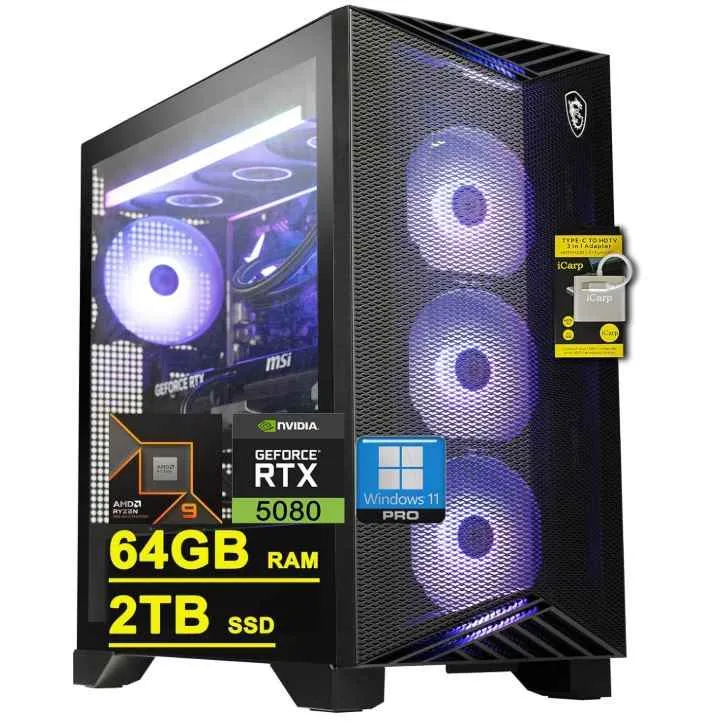
The MSI Aegis ZS2 pushes strong speed through its Ryzen 9 9900X, beefy 64GB DDR5 stack, and an RTX 5080 that drives heavy titles without strain. The 360mm liquid loop keeps the chip steady while the 850W Gold unit feeds clean power during long gaming sessions.
The MSI Aegis ZS2 toffers strong gaming performance with the Zen 5 Ryzen 9 9900X paired with an RTX 5080. This gaming tower moves renders heavy game scenes as it is fueled by the top gaming CPU on the market. With a massive 64GB DDR5 RAM, it lifts off game loads, edits, and streams without slowing down you machine.
The 2 TB SSD NVMe brings quick starts and near-instant zone swaps in open-world titles. You jump into PUBG matches without delay and stutter. Swap the the 2TB drive with a 4TB if you want to install a massive gaming library.
The design of MSI Aegis ZS2 gaming PC isn’t as appealing compared to Thermaltake LCGS i1480S or Stormcraft Phantom AI. It simply comes with a mesh panel at the front , behind which are 3 gigantic RGB intake fans. There is a side glass panel installed, however, much part of it is covered in black plastic which interrupt the full view of the internals.
I won’t put stress on design and I know it’s the gaming performance that matters in a gaming PC. Therefore, from the hardware perspective, this is a beast gaming machine. It comes with a powerful 12-core CPU, an RTX 5080 graphics card capable of latest-gen ray-tracing and DLSS for high-level gameplay. Finally, this machine has all the advanced I/Os one requires in a hardcore gaming PC.
5. Skytech Gaming Azure 3 Plus
CPU: AMD Ryzen 7 7800X3D | Graphics Card: Nvidia GeForce RTX 5080 | RAM: 32 GB DDR5 | Storage: 1TB Gen4 NVMe SSD | Operating System: Windows 11 Pro | I/Os: Wi-Fi, HDMI, Display Port, USB 2.0, 3.0, and 3.2 Gen1 Ports
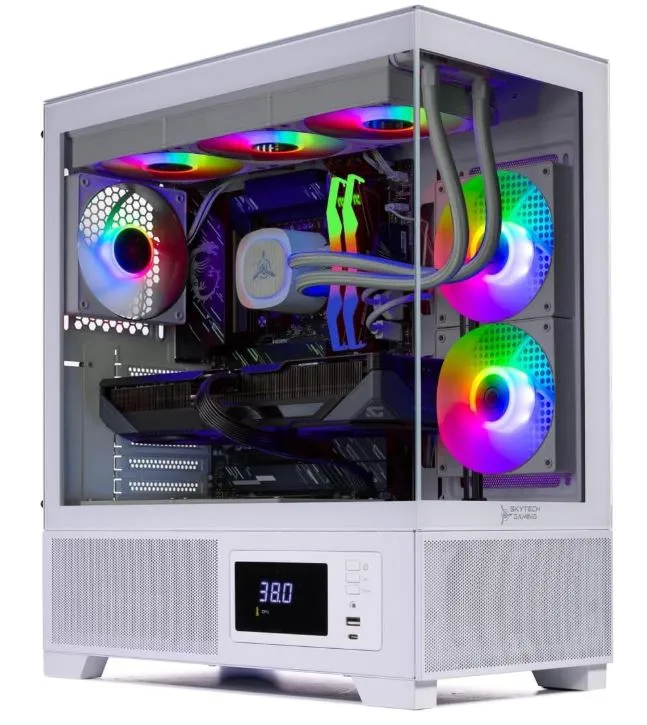
The Skytech Gaming Azure 3 Plus brings real gaming strength for budget-friendly gamers with the Ryzen 7 7800X3D, Gen 4 SSD drive, and low-latency DDR5 RAM.
The Skytech Gaming Azure 3 Plus is the cheapest RTX 5080 prebuilt to buy right now. I’m a fan of the aesthetics on this PC. The chassis comes with transparent front and side glass panels, clean lines, and steady airflow through wide intake paths. The 360 AIO fills the top with strong coverage, and the ARGB layout stays bright even in the daylight. The build feels sturdy and cable routing is one the best I’ve seen on any other CP from Skytech.
This gaming PC shows a perfect balance when it comes to internals. The Ryzen 7 7800X3D renders game logic faster, and the RTX 5080 pushes dense frames without drops. Moreover, it comes with 32 GB DDR5 and 2 TB Gen-4 SSD drive for installing games.
In gaming performance, the titles I tested on Skytech Gaming Azure 3 Plus were highly playabe at 4K settings . Call of Duty held strong FPS during intense action scenes. Cyberpunk moved through heavy draw calls without sharp drops. Diablo IV kept clear motion during action scenes, and Starfield pushed stable output during long flights and crowded zones. The system stayed cool, and no major stutter hit my sessions. Moreover, I played other hot titles like Valorant, World of Warcraft, League of Legends, Apex Legends, and PUBG at 100+ FPS.
The Skytech Gaming Azure 3 Plus suits gamers who want higher FPS at a reasonable price. This is a gaming machine highly-optimized for AAA, RPGs, and open world titles.
How to Choose A Prebuilt RTX 5080 Gaming PC?
To choose a prebuilt RTX 5080 gaming PC, consider the following criteria.
1. Powerful CPU
RTX 5080 is a top-tier graphics card and to catch up with the pace of such a strong GPU, you should consider a faster CPU. A CPU has to process the game logic in real time to avoid any bottlenecking or stuttering issues. Both the Intel Ultra Series and AMD’s Zen 5 processors provide enough power to process the intense graphical instructions to be sent over to RTX 5080 chip. Therefore, make sure you buy a gaming PC with either Intel Core Ultra 7/9 or AMD Ryzen 7/9 X3D CPUs if it comes with an RTX 50-Series graphics card.
2. RAM
Although, modern gaming PCs come with at least 16GB of RAM to meet he minimum gaming requirements, I still suggest going with 32GB or higher for smoother experience. The “Amount” of RAM alone doesn’t justifies the equation here, a RAM has to be faster enough (low latency) to communicate between the CPU and strong GPU like the RTX 5080.
I will count on the gaming PC with a beefy plus higher clocked RAM for efficient gaming and multitasking performance. A DDR5 RAM module with 6000 MHz or higher ensures fast frame delivery and reduces latency in modern games. 16GB is the minimal and 32GB is the recommended amount of RAM to have in a modern gaming desktop.
3. Storage
Storage plays a critical role in overall system performance because it directly affects game load times, installation speed, and how quickly your OS and applications respond. Modern 4K and high-fidelity games rely heavily on fast storage, making SSDs especially NVMe M.2 drives essential due to their dramatically higher throughput and lower latency compared to SATA SSDs or traditional HDDs.
For most gamers and power users, 1 to 2TB has become the practical minimum to store multiple AAA titles, system files, and essential software without constantly juggling space. Choosing a PCIe Gen4 or Gen5 NVMe SSD ensures future-proof performance.
4. PSU (Power Supply)
A high-quality power supply (PSU) is essential for maintaining system stability, preventing voltage drops, and ensuring your components perform reliably under heavy load. For upcoming RTX 5080–class builds, a 750–1000W unit is typically recommended, with the exact wattage depending on your CPU choice, overclocking potential, and connected peripherals.
Choosing an 80+ Gold or Platinum–certified PSU improves power efficiency, reduces heat output, and supports long-term component health. A fully modular design is also ideal, as it allows you to connect only the necessary cables, resulting in cleaner cable management, better airflow, and easier maintenance.
5. Cooling
A robust cooling system is essential for high-performance builds because modern CPUs and GPUs generate substantial heat, and inadequate cooling can lead to thermal throttling, reduced frame rates, and excessive fan noise.
AIO liquid coolers (240–360mm) are ideal for CPU-intensive setups, offering stable temperatures and quieter operation compared to many air coolers. Your case should also support strong airflow with multiple intake and exhaust fan placements, dust filters, and good cable-routing channels to maintain clean, unobstructed airflow.
6. Motherboard
The motherboard is the backbone of your system, determining compatibility, expansion flexibility, and long-term upgrade potential. Modern chipsets like Intel’s Z890 or AMD’s X670 provide full support for PCIe Gen4/5 lanes, high-speed DDR5 RAM, and multiple M.2 NVMe slots for next-gen storage.
A well-equipped board should also offer a rich selection of connectivity options such as USB-C and USB-A ports, HDMI and DisplayPort outputs, Wi-Fi 6/6E, Bluetooth 5.3, and high-quality 7.1 audio to ensure seamless use of modern peripherals.
7. Aesthetics
Aesthetics and build quality play a big role in both the durability and usability of your system, as a well-designed case not only protects components but also supports efficient airflow and easy future upgrades. Tempered glass side panels are popular for showcasing internal components and RGB lighting, adding visual appeal to gaming setups.
Good cable-management features—such as hidden routing channels, Velcro straps, and spacious back panels—help maintain clean airflow pathways and reduce heat buildup.
Buy an RTX 5080 gaming desktop that comes with balance hardware, high-end cooling, adequate power, and sturdy build quality. My favorite and high-rated RTX 5080 gaming PC is the Stormcraft Phantom AI. It beats every other gaming rig when it comes to 4K gameplay. It is a well-balance gaming PC fueled by Intel’s next-gen Core Ultra 7 265F clocked at 5.3 GHz. I liked the aesthetics which sits well with the parts chosen to build this machine.
Which CPU performs best with the RTX 5080 graphics card?
AMD Ryzen 7 9800X3D packed with 3D V-Cache technology offers solid gaming perofrmance with the RTX 5080 graphics card. With 3D V-Cache, Ryzen 7 9800X3D easily handles 4K gaming when paired with RTX 50-Series cards. Ryzen 7 9800X3D offers a 5.2GHz boost clock speed, which is another strong factor for boosting the gaming performance.
Which RTX 5080 Prebuilt Gaming PC should I buy?
The best RTX 5080 prebuilt gaming PC to buy is the one that fits your budget and gaming expectations. This guide includes the top 5 gaming rigs from different brands. The Stormcraft Phatom AI offers solid 4K gaming performance, but for a higher price tag. On other hand, Skytech Gaming Azure 3 Plus is slightly cheaper RTX 5080 prebuilt gaming desktop with powerful hardware.

Mosaab Jamal Ahmed brings 12+ years of PC Hardware experience to the table. His journey began in 1998 with a Pentium 1 PC, igniting his lifelong fascination with computer hardware and video games. Over the years, Mosaab has honed his skills in upgrading and building gaming PCs. He has built dream gaming machines for multiple brands and local businesses throughout his career. Mosaab’s areas of expertise are building custom gaming PCs, in-depth PC hardware analysis, and PC hardware reviews.